모든 Documentize 클라이언트를 위한 하나의 허브
Desktop & Terminal clients for PDF processing
Native clients that connect to the Documentize API directly from your desktop or terminal. No browser required — pick the version that fits your OS and workflow.
One Premium subscription licenses every developer tool — no separate license to buy.
- MCP server
- CLI
- Self-Host
- Desktop
Enable your paid subscription
Desktop and terminal clients don't share your browser session, so they need your API token to unlock your paid subscription. Sign in on the web app, open the side menu, and click Copy API token to copy it to your clipboard — then paste it into the client as described below. Once an API key is set, it's sent with every request and takes priority over any signed-in session, so the client uses your subscription immediately. Leave the field empty to sign in interactively instead; either method gives the client access to your paid plan.
- Open the client and go to Settings (in the TUI, it's on the main menu).
- Paste your copied token into the API Key field of your profile — labeled "API Key (optional)" in the Windows and Linux clients, "API Key:" in the TUI (input is masked).
- Save the profile — the client now uses your subscription on every request.
Windows (MAUI)
The Windows client is built with .NET MAUI and runs natively on Windows 10 or later.
Requirements
- Windows 10 version 1809 (build 17763) or later
- x64 processor architecture
Setup
- Download and extract
pdfcon_windows.zip - Run
PDFCON.exefrom the extracted folder
No installer is required — the package is self-contained and runs directly after extraction.
Linux (Avalonia)
The Linux client is built with Avalonia UI and supports X11 and Wayland display servers.
Requirements
- 64-bit Linux (Ubuntu 22.04+ or equivalent)
- X11 or Wayland display server
- Required libraries:
libfontconfig1,libfreetype6,libglib2.0-0,libgl1
Setup
- Download and extract
pdfcon_linux.zip - Install required dependencies if not already present:
sudo apt-get install -y libfontconfig1 libfreetype6 libglib2.0-0 libgl1- Make the binary executable and run it:
chmod +x ./PDFCON
./PDFCON
TUI — Terminal client (cross-platform)
A lightweight terminal interface built with Terminal.Gui. Runs entirely in the console with no display server required — ideal for servers and headless environments.
Requirements
- Windows 10+, Linux, or macOS
- Any terminal emulator (xterm, Windows Console, iTerm2, etc.)
Setup on Windows
- Download and extract
pdfcon_tui.zip - Open a terminal and run:
PDFCON.Tui.exeSetup on Linux / macOS
- Download and extract
pdfcon_tui.zip - Make the binary executable and run it:
chmod +x ./PDFCON.Tui
./PDFCON.Tui
Run everything on your own computer (self-host)
By default the clients send files to the hosted Documentize API. You can instead point them at a self-host instance of the engine — the same API, running on your machine or your own server — so documents are processed locally and never leave your network. There are two ways to do this.
Option A — let the Windows client run the engine for you
The Windows client can download and run the engine itself, no .NET or Docker required.
- Open Settings → Run Documentize on this computer.
- Click Install. The client downloads
Documentize.SelfHostinto your user profile (%APPDATA%\PDFCON\self-host) and starts it on a local loopback port. - Click Use locally. The active provider switches to "Documentize (on this computer)" and every subsequent operation runs on-device.
If you are signed in with a paid subscription, the client fetches a signed entitlement key from your account and passes it to the local engine automatically, so watermark-free processing and full limits work with no extra steps. Stopping the engine or choosing a cloud profile again switches back.
Option B — point a client at an instance you already run
If you started Documentize.SelfHost yourself (see the self-host guide — dotnet Documentize.SelfHost.dll or the Docker image), add a provider profile that targets it. This works from the Windows, Linux, and TUI clients.
- Start your instance and note its URL —
http://localhostfor the defaultdotnetrun,http://localhost:8080if you mapped Docker to another port. - In the client, go to Settings and add (or edit) a provider profile:
- Kind: Documentize REST
- Base URL:
http://localhost/webapi/(keep the trailing/webapi/) - API Key (optional): leave empty for the free tier, or paste a SelfHost activation key /
DMZ1.…subscription key to unlock full limits on that instance.
- Make the new profile the active one and save.
Licensing the local instance (Aspose .lic, an activation key from your account, or a self-issued DMZ1.… key) is configured on the instance itself — see Licensing & Subscription on the self-host page. The per-request API Key field above is only needed when you want a specific client to present its own key.
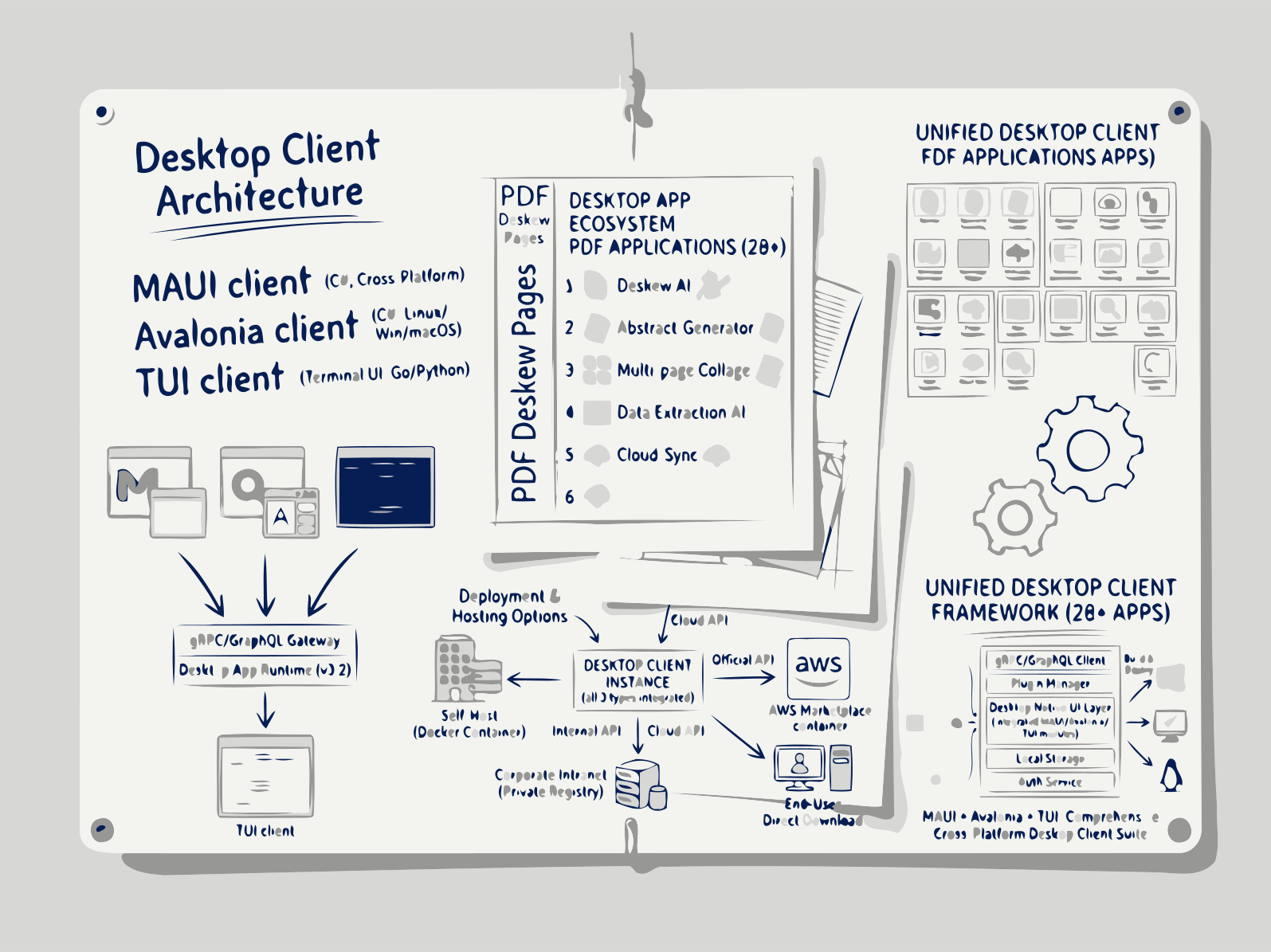
플랫폼을 선택하고 다운로드하면 몇 초 만에 Documentize와 동기화됩니다.
Documentize Desktop은 PDF 및 문서 처리를 네이티브 클라이언트로 제공합니다. Windows 앱, Linux 앱, 그리고 macOS에서도 실행되는 터미널 클라이언트가 있습니다. API 토큰으로 Documentize 클라우드에 로그인하거나 셀프 호스팅 서버에 연결해 파일을 내 컴퓨터에서 처리하세요.
시작하는 방법
1. 클라이언트 선택
GUI 환경을 위해 Desktop을 선택하거나 명령줄 워크플로를 위해 Terminal을 선택하세요.
2. 다운로드 및 설치
다운로드 버튼을 클릭하고, 설치 프로그램을 실행하거나 압축 파일을 풀고, 애플리케이션을 실행하세요.
3. Documentize에 연결
클라우드 자격 증명을 입력하거나 자체 호스팅 API 엔드포인트를 구성하여 문서 동기화를 시작하세요.
4. 동기화 및 AI 기능 사용
모든 파일이 즉시 동기화되며, AI 기반 제안, 요약 및 검색을 어디서든 사용할 수 있습니다.
FAQs
Documentize Desktop 클라이언트
통합 클라우드 및 자체 호스팅 지원
동일한 UI와 명령어를 사용하여 Documentize SaaS 또는 자체 온프레미스 API에 연결하세요.
AI 기반 지원
통합 AI 엔진을 사용하여 클라이언트에서 직접 요약하고, 검색하며, 콘텐츠를 생성합니다.
오프라인 모드
오프라인으로 작업합니다; 변경 사항은 대기열에 쌓였다가 다시 연결하면 동기화됩니다.