Один хаб для всіх клієнтів Documentize
Desktop & Terminal clients for PDF processing
Native clients that connect to the Documentize API directly from your desktop or terminal. No browser required — pick the version that fits your OS and workflow.
One Premium subscription licenses every developer tool — no separate license to buy.
- MCP server
- CLI
- Self-Host
- Desktop
Enable your paid subscription
Desktop and terminal clients don't share your browser session, so they need your API token to unlock your paid subscription. Sign in on the web app, open the side menu, and click Copy API token to copy it to your clipboard — then paste it into the client as described below. Once an API key is set, it's sent with every request and takes priority over any signed-in session, so the client uses your subscription immediately. Leave the field empty to sign in interactively instead; either method gives the client access to your paid plan.
- Open the client and go to Settings (in the TUI, it's on the main menu).
- Paste your copied token into the API Key field of your profile — labeled "API Key (optional)" in the Windows and Linux clients, "API Key:" in the TUI (input is masked).
- Save the profile — the client now uses your subscription on every request.
Windows (MAUI)
The Windows client is built with .NET MAUI and runs natively on Windows 10 or later.
Requirements
- Windows 10 version 1809 (build 17763) or later
- x64 processor architecture
Setup
- Download and extract
pdfcon_windows.zip - Run
PDFCON.exefrom the extracted folder
No installer is required — the package is self-contained and runs directly after extraction.
Linux (Avalonia)
The Linux client is built with Avalonia UI and supports X11 and Wayland display servers.
Requirements
- 64-bit Linux (Ubuntu 22.04+ or equivalent)
- X11 or Wayland display server
- Required libraries:
libfontconfig1,libfreetype6,libglib2.0-0,libgl1
Setup
- Download and extract
pdfcon_linux.zip - Install required dependencies if not already present:
sudo apt-get install -y libfontconfig1 libfreetype6 libglib2.0-0 libgl1- Make the binary executable and run it:
chmod +x ./PDFCON
./PDFCON
TUI — Terminal client (cross-platform)
A lightweight terminal interface built with Terminal.Gui. Runs entirely in the console with no display server required — ideal for servers and headless environments.
Requirements
- Windows 10+, Linux, or macOS
- Any terminal emulator (xterm, Windows Console, iTerm2, etc.)
Setup on Windows
- Download and extract
pdfcon_tui.zip - Open a terminal and run:
PDFCON.Tui.exeSetup on Linux / macOS
- Download and extract
pdfcon_tui.zip - Make the binary executable and run it:
chmod +x ./PDFCON.Tui
./PDFCON.Tui
Run everything on your own computer (self-host)
By default the clients send files to the hosted Documentize API. You can instead point them at a self-host instance of the engine — the same API, running on your machine or your own server — so documents are processed locally and never leave your network. There are two ways to do this.
Option A — let the Windows client run the engine for you
The Windows client can download and run the engine itself, no .NET or Docker required.
- Open Settings → Run Documentize on this computer.
- Click Install. The client downloads
Documentize.SelfHostinto your user profile (%APPDATA%\PDFCON\self-host) and starts it on a local loopback port. - Click Use locally. The active provider switches to "Documentize (on this computer)" and every subsequent operation runs on-device.
If you are signed in with a paid subscription, the client fetches a signed entitlement key from your account and passes it to the local engine automatically, so watermark-free processing and full limits work with no extra steps. Stopping the engine or choosing a cloud profile again switches back.
Option B — point a client at an instance you already run
If you started Documentize.SelfHost yourself (see the self-host guide — dotnet Documentize.SelfHost.dll or the Docker image), add a provider profile that targets it. This works from the Windows, Linux, and TUI clients.
- Start your instance and note its URL —
http://localhostfor the defaultdotnetrun,http://localhost:8080if you mapped Docker to another port. - In the client, go to Settings and add (or edit) a provider profile:
- Kind: Documentize REST
- Base URL:
http://localhost/webapi/(keep the trailing/webapi/) - API Key (optional): leave empty for the free tier, or paste a SelfHost activation key /
DMZ1.…subscription key to unlock full limits on that instance.
- Make the new profile the active one and save.
Licensing the local instance (Aspose .lic, an activation key from your account, or a self-issued DMZ1.… key) is configured on the instance itself — see Licensing & Subscription on the self-host page. The per-request API Key field above is only needed when you want a specific client to present its own key.
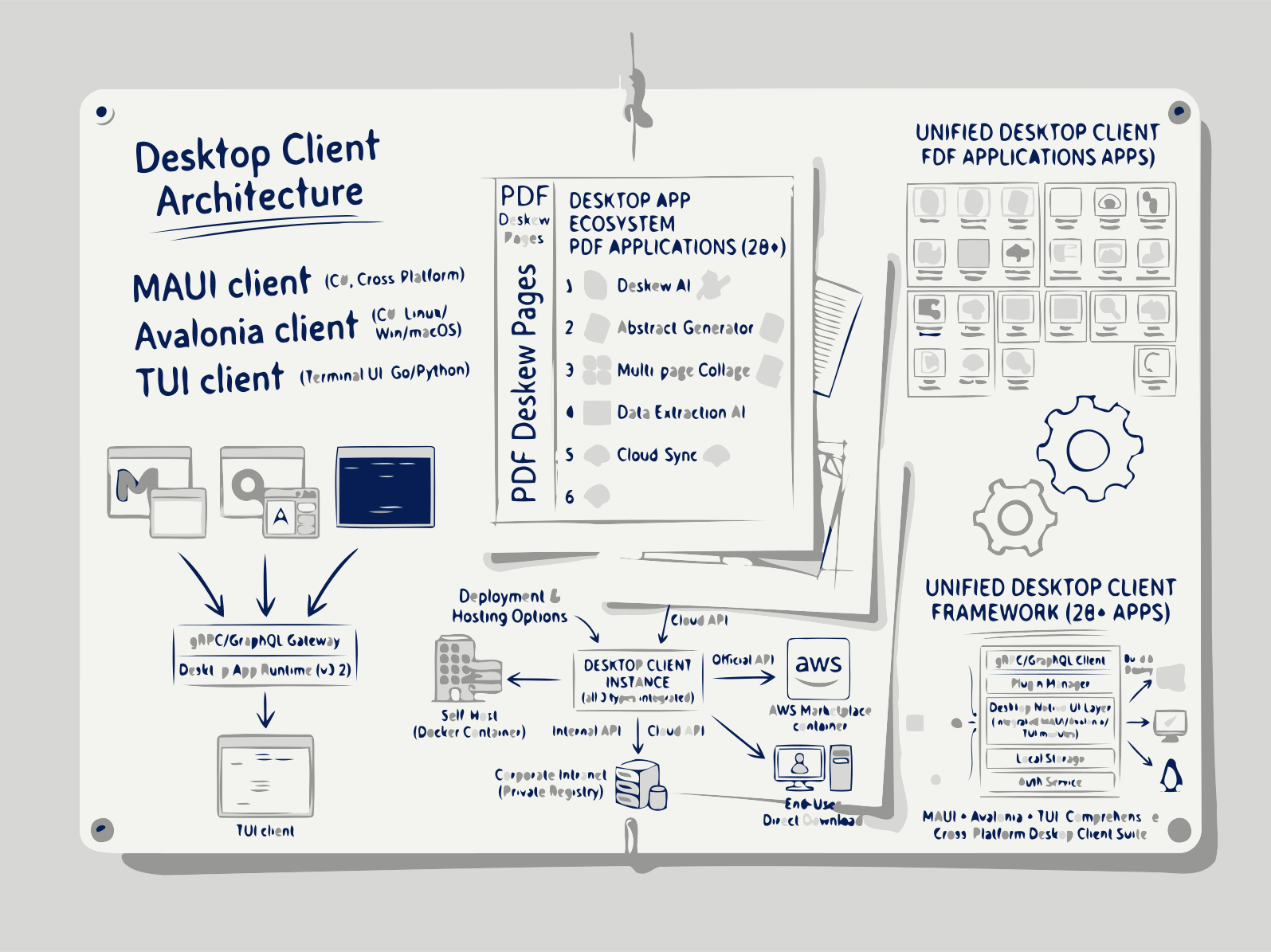
Виберіть свою платформу, завантажте клієнт і почніть синхронізуватися з хмарою Documentize або вашою приватною API за кілька секунд.
Documentize Desktop переносить обробку PDF і документів у нативні клієнти: застосунок для Windows, застосунок для Linux і термінальний клієнт, який працює також на macOS. Увійдіть у хмару Documentize за API-токеном або під'єднайтеся до власного сервера (self-hosted), щоб файли оброблялися на вашій машині.
Як розпочати
1. Оберіть свій клієнт
Виберіть Desktop для графічного досвіду або Terminal для робочих процесів у командному рядку.
2. Завантажити та встановити
Натисніть кнопку завантаження, запустіть інсталятор або розпакуйте архів, а потім запустіть застосунок.
3. Підключитися до Documentize
Введіть ваші хмарні облікові дані або налаштуйте власний API-endpoint, щоб розпочати синхронізацію документів.
4. Синхронізація & використання функцій ШІ
Усі ваші файли синхронізуються миттєво, а пропозиції, резюме та пошук на базі ШІ доступні скрізь.
FAQs
Клієнти Documentize Desktop
Універсальна підтримка хмари та самостійного хостингу
Підключіться до Documentize SaaS або вашого власного локального API з однаковим інтерфейсом та командами.
Помічник з ШІ
Резюмуйте, шукайте та створюйте контент безпосередньо з клієнта, використовуючи інтегрований ШІ‑двигун.
Офлайн режим
Працюйте офлайн; зміни ставляться у чергу і синхронізуються при повторному підключенні.
Ціни
Безкоштовний план
- Усі настільні та CLI‑клієнти, необмежена синхронізація, хмарні або самостійно розгорнуті підключення.
Преміум план
- Повний доступ до всіх застосунків Documentize AI
- Розширені щоденні ліміти обробки
- Пріоритетна обробка та безкоштовна підтримка
Преміум план
- Повний доступ до застосунків Documentize
- Більш просунуті інструменти та функції
- Розширені обмеження обробки файлів
- Безкоштовна підтримка